Account Settings
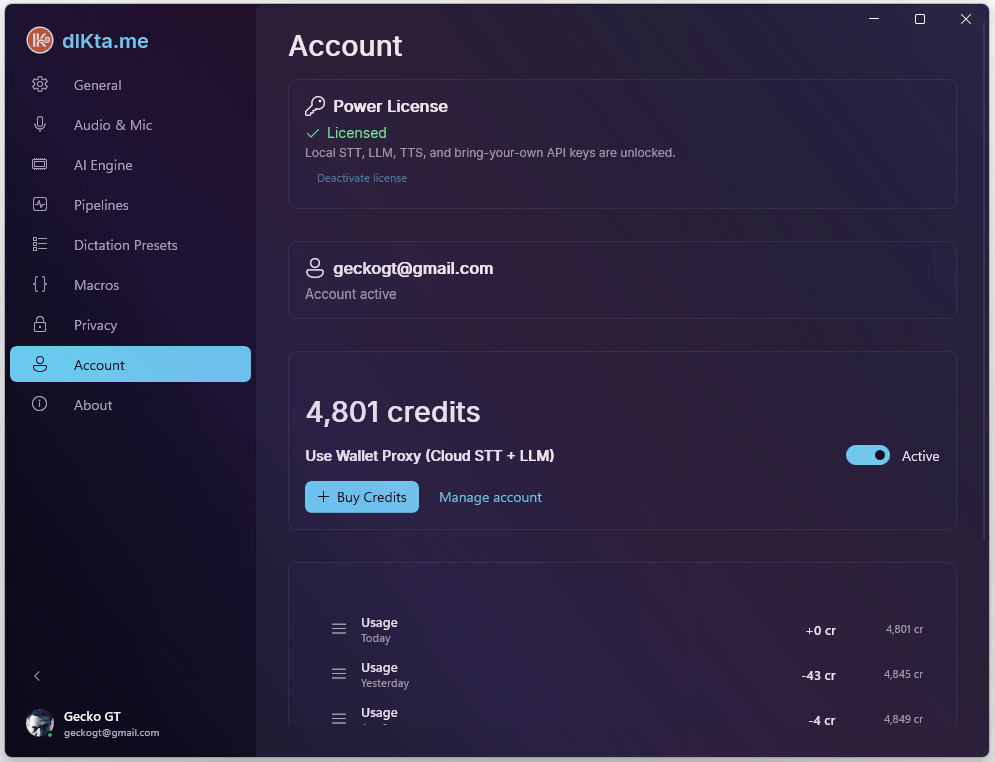
The Account tab manages your Power License, Wallet balance, and cloud sign-in.
To **change** anything (buy credits, update avatar, manage newsletters) use the [Web Dashboard](../dashboard.md). This tab is a local read-mostly view of the same data.
Power License
The Power License unlocks two additional authentication modes:
- API Key (BYOK) Mode — bring your own Deepgram, Gemini, Anthropic, OpenAI, OpenRouter, or Requesty keys
- Local Mode — run fully offline with Whisper.net and Ollama on your own hardware
Without a Power License, Wallet Mode (cloud dictation using dIKta.me credits) is available for free after signing in.
Activating your license
- Purchase a Power License at dikta.me/pricing. You'll receive a GUID license key by email.
- In the Account tab, paste the key into the License Key field.
- Click Activate.
The key is validated online against the LemonSqueezy License API and then stored securely with Windows DPAPI. Once activated, dIKta.me works offline for up to 30 days without an internet re-check.
Each key supports up to 3 machine activations. To move your license to a different PC, click Deactivate first.
Authentication Modes
dIKta.me supports three modes, switchable from the Control Panel:
- Wallet Mode — Every dictation, translation, and chat request deducts credits from your pre-loaded balance. No API keys needed — just sign in.
- API Key Mode (Power License required) — Requests go directly from your machine to each AI provider using your own developer keys. dIKta.me servers are never in the path.
- Local Mode (Power License required) — Fully offline. dIKta.me talks only to Ollama and Whisper.net running on your hardware.
All Dictation settings, Macros, and customizations are preserved regardless of mode or sign-out.
Wallet & Credits
Sign in with your dIKta.me account (via secure browser OAuth) to activate Wallet Mode.
Balance
Your balance is shown in credits (1 credit = $0.001). The Control Panel HUD displays a compact version (e.g., 4.8k C).
Color indicators:
- Green — 1,000+ credits
- Yellow — 500–999 credits
- Red — below 500 credits
Buying credits
Click Buy Credits to open a checkout for the 4,000-credit pack ($5). If signed in, your email is pre-filled. Credits appear in your balance immediately after purchase.
Usage history
The Usage History section shows daily credit summaries. Each row displays:
| Column | Description |
|---|---|
| Type | Usage, Purchase, Refund, etc. |
| Date | Day the activity occurred |
| Amount | Credits consumed or added (e.g., −12 cr) |
| Balance | Running balance after that day |
Click View detailed usage history → to open the full dashboard at dikta.me/dashboard.
Profile
- Avatar Customization: Upload a custom profile picture. A built-in circular cropping tool fits it perfectly in the HUD and Quick Chat window.
- Sign Out: Clears session tokens and returns to unauthenticated state.